
Asset Management
Weavestream's asset system lets you build structured records for any kind of infrastructure. You define the fields, and every tenant's assets conform to that schema.
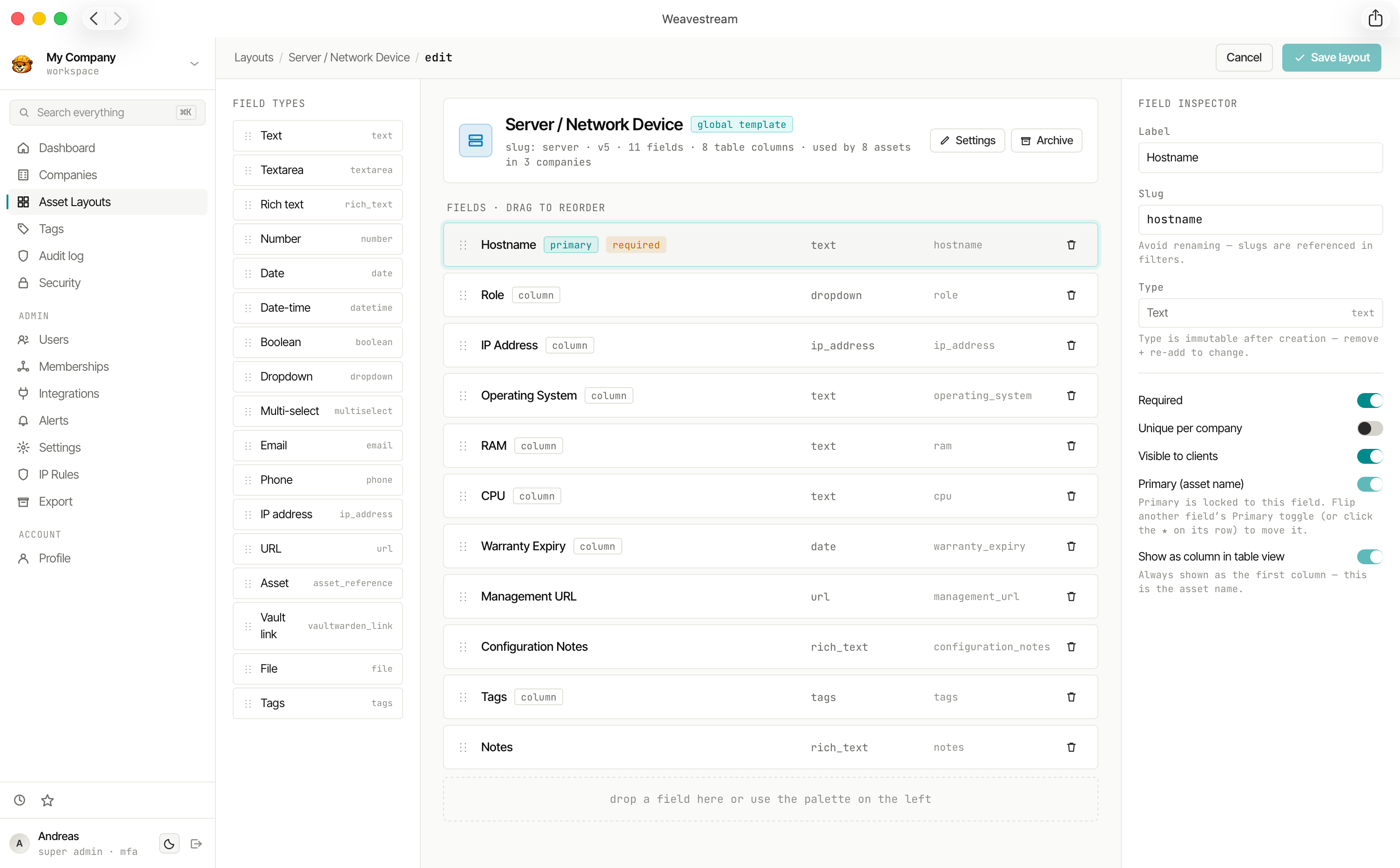
Asset Layouts
An Asset Layout is a global template — think of it as a form definition. Each layout has a name, an optional icon, and a list of fields. Layouts are managed by SUPER_ADMIN users and shared across all tenants.
Examples of layouts you might create:
- Server — hostname, IP address, operating system, CPU, RAM, warranty expiry
- Workstation — assigned user, serial number, purchase date, warranty date
- Software License — product name, vendor, seat count, license key, renewal date
- Network Device — make, model, firmware version, management IP, location
- SSL Certificate — domain, issuer, expiry date, notes
Layout management
- Rename layouts in place without affecting existing assets
- Archive layouts to hide them from the creation picker while preserving historical records
- Drag-and-drop field reordering within the layout builder
- Sidebar sections with custom positioning for grouping related fields
Field Types
Each layout can contain any combination of the following field types:
Field Options
Each field supports additional configuration:
Asset Records
Each Asset is a single instance of a layout within a tenant. Assets support:
- Soft-archive — remove from active lists while preserving the full historical record
- Permanent deletion — requires the asset to be archived first; this is enforced server-side for both single and bulk purge, and purging additionally requires step-up re-authentication. Bulk purge skips still-active assets and reports them so you can archive and retry
- External ID tracking — for synchronising with external systems
- Embedded passwords — link credentials directly to an asset; they archive when the asset is archived
- Cross-references —
ASSET_REFERENCEfields create navigable links between assets
Copying and Moving Assets
Copy an asset into another company (or duplicate it in the same one) from the asset's ⋯ → Copy to company… menu, or select several in the asset table and use Copy to…. Tick Move to archive the originals after copying: they are archived, not deleted, so they can be restored.
Asset layouts are global, so a copy keeps its layout and every field value you can see, handled as follows:
Move is refused, with the reason, when it would lose or undo something: the asset is kept in sync by an integration (the next sync would restore the original), it has linked passwords (they would be archived with it), or some of its fields are hidden from you. Copy it instead in those cases.
Copying needs read access to the source company and write access to the target; moving also needs archive access to the source. Read-only users can select several assets in the table to copy them; archive, restore and delete stay hidden. If a bulk run fails part-way, the assets already copied are removed from the selection, so a retry copies only the rest. A field marked unique per company that is already taken in the target makes that copy fail with a clear message; the other copies in a bulk run still go through. Each copy is audited (asset.clone, plus upload.copy per file).
Expiration Tracking
DATE and DATETIME fields with expiry tracking enabled appear in the global Expirations dashboard (/admin/expirations). Cells are colour-coded:
- Green — within a healthy window
- Amber — approaching expiry
- Red — expired
This lets you surface warranty expirations, license renewals, and certificate deadlines across all tenants at a glance.
Dismissing items
Every row on Expiring soon (global and per company) has a Dismiss button, with an optional note such as "client cancelled, letting it lapse". A dismissed item:
- disappears from Expiring soon, stops sending expiry alert emails, and stops counting on the dashboard's domain alerts (unless the domain is also listed there for a low score);
- applies to that due date only. If the date changes, for example a renewal that later lapses again, the item shows up again;
- changes nothing about the asset, domain or password itself.
Use Show dismissed to see dismissed items with their note, and Restore to bring one back. Dismissing needs the same permission as managing the item (domain.manage, asset.write, or password.write plus access to that password), and every dismiss and restore is in the audit log.
Search
All asset field values are indexed in the SearchIndex table for full-text search via the command palette and the /api/search endpoint. Results are scoped to the requesting user's accessible tenants.